If you searched for an Artsteps alternative recently, you may have already noticed: you can't sign in, or you can't start a new exhibition. That's not a glitch. Artsteps is being retired, and its makers now point new projects to a paid platform called Metasteps.
This guide is for artists who still want a virtual exhibition — usually alongside, or instead of, a show in a physical gallery. We'll look at what has changed at Artsteps, what a real gallery really costs, and why how your work looks in a virtual room matters more than any feature list.
Want to see the difference first? Walk through the Xibit360 demo gallery, or step into a museum-quality room right here:
What changed at Artsteps
Artsteps was one of the best-known free 3D exhibition builders, and it earned that reputation: it was approachable, worked well for classroom projects, and let anyone build a walkable room without 3D skills.
As of October 2026, Artsteps' own FAQ says the service is being phased out:
- No new accounts or exhibitions. "Account access and exhibition creation or editing are no longer available. Existing exhibitions remain viewable for now."
- Maintenance mode. "No new sign-ups are available. All new virtual gallery creation now takes place on Metasteps."
- Editing only for paying customers. Editing remains for users with an active paid product, such as a Private Space or a purchased template.
- Moving needs a subscription. Migrating existing exhibitions to Metasteps is offered with an annual Metasteps plan.
Metasteps, from the same company, is subscription-only: Creator €14/month (1 space, 200 MB), Creator Pro €29/month (5 spaces, 1 GB), and Business €99/month (20 spaces, 10 GB), each with a 14-day trial. There is no free plan. (Sources: Artsteps FAQ, Metasteps pricing, checked October 5, 2026.)
So the old question — "Artsteps is free, why switch?" — has changed. The real question now is: where should your work live next, and what should it cost?
The real comparison: a physical gallery
Most artists looking at virtual galleries aren't choosing between two apps. They're weighing a virtual room against renting a real one. So let's be honest about what a real one costs.
One week of gallery hire for a solo show (venues' own published rates, October 2026):
| City | Typical weekly hire | Examples |
|---|---|---|
| New York | about $3,300–$12,300 | Parasol Projects, 2 Rivington St (550 sq ft, price varies by season) |
| London | about £1,000 + VAT to £9,250 + VAT | Four Corners (student rate) to Bankside Gallery |
| Tokyo | about ¥187,000–¥616,000 | Gekkoso, Ginza to Ginza Art Hall |
And the hire fee is only the start. Framing, shipping, printed invitations, and an opening reception add up quickly. In London, for example, Brick Lane Gallery lists hanging, sitters, photography, and press as paid extras. Some venues also take a 10–30% commission on sales.
A physical show is still something special. But it lasts a week or two, it reaches the people who can travel to it, and when it ends, it's gone.
A virtual room only works if your work looks right in it
This is where many free tools fall short, and where Artsteps had a known limit. Its FAQ explains that uploaded images are downscaled to a maximum of 768 × 512 pixels "to ensure performance" — and that this "can cause images to appear blurry or pixelated when viewed up close."
Here is what that means in practice. Below is the same detail of Hokusai's Under the Wave off Kanagawa (public domain, Art Institute of Chicago), enlarged to the same size. Look at the title cartouche and the spray of the wave:
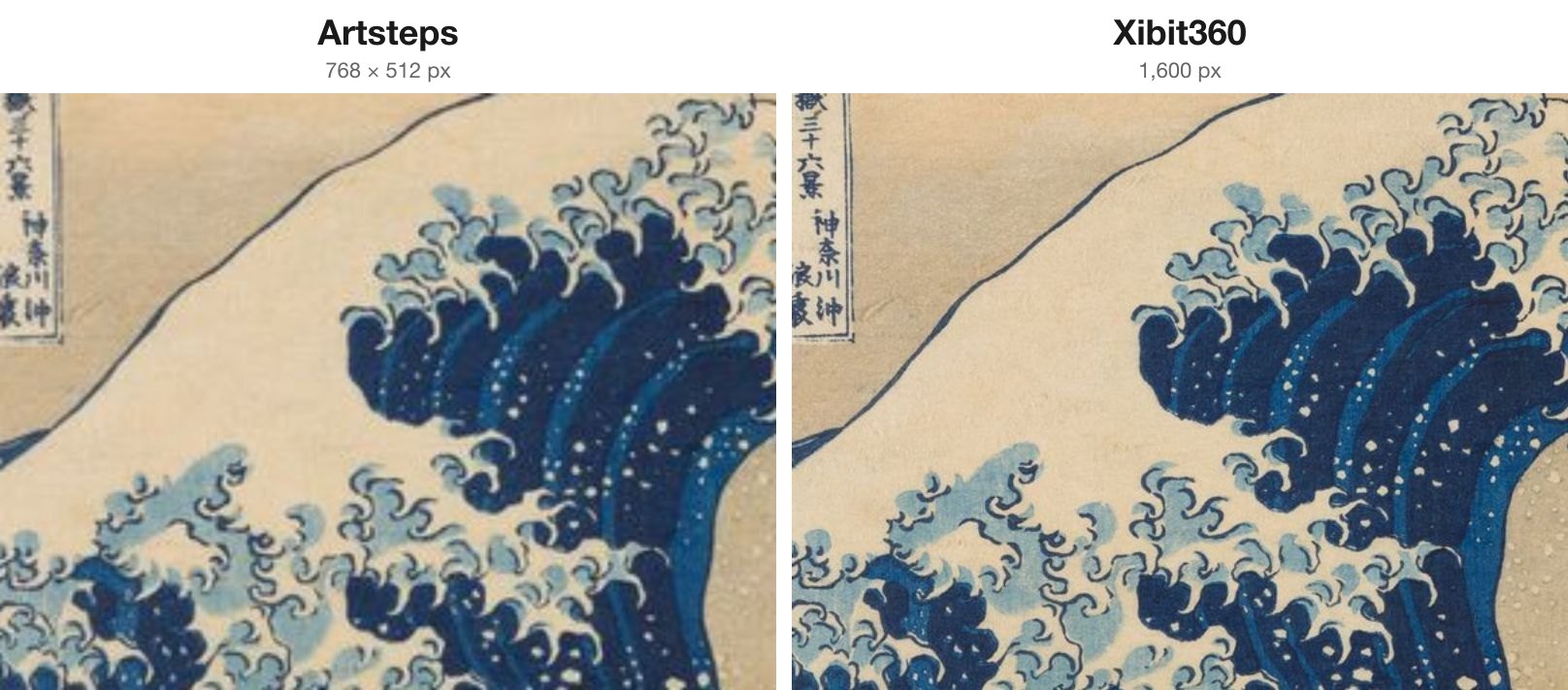
When a visitor walks up to a painting, this is the difference they feel: brushwork, paper texture, the fine lines that make the work yours.
Why Xibit360: three things, done properly
1. Easy to set up — you choose, it composes
Building a room in a classic 3D editor means drawing walls on a grid, then placing, moving, rotating, and scaling each artwork by hand. That flexibility is real, and so is the time it takes.
Xibit360 starts from gallery-ready rooms instead:
- Upload your works and arrange them with one button. Fine-tune the order on a simple floor plan afterwards.
- Pick a theme and a layout, such as Single Hall, Center Wall, or Portrait Hall. The room is already lit, proportioned, and finished.
- Choose a frame and mat for each work from a menu. Every frame style is included, even on the free plan.
You spend your time on the exhibition, not on the software.
2. A fraction of a real show — paid once, open for good
Xibit360 has a free plan: one room and up to five works, with every frame style. Upgrades are one-time purchases, with no subscription:
| Upgrade | One-time price |
|---|---|
| Extra exhibition room (15 works included) | $25 |
| Extra artwork slot | $3 |
| Video Pass (show video works) | $20 |
| New theme | $8 |
| New layout | $5 |
| Storage pack (+1 GB) | $10 |
For example, a 20-work solo show costs $25 once: your free room (5 works) plus one extra room (15 works). There's no closing date. It stays open until you decide to close it. Compare that with $3,300 or more for a single week in New York, before framing and shipping.
For a closer look at paying once versus monthly, see our guide to virtual galleries without a subscription.
3. Not just looking — being there
A virtual exhibition shouldn't feel like scrolling thumbnails on a wall. Xibit360 is built to feel like a visit:
- Gallery light, framing, and soft shadows, set for each work, with mats in standard, 15 cm, or 25 cm widths.
- Surface texture that catches the light. Brushwork and paper grain come forward as you move.
- Music and an audio guide. Write a caption, and Xibit360 reads it aloud in a natural voice. No recording is needed, and you can upload your own narration if you prefer.
- A guided tour with a camera that knows where to look. It approaches each work, pauses, and moves on.
- The same room on desktop and phone, with nothing to install.
Side-by-side
| Physical gallery | Artsteps (today) | Metasteps | Xibit360 | |
|---|---|---|---|---|
| Cost | Weekly hire (see above) + framing, shipping, invitations | Free to view; no new exhibitions | €14–€99 per month | Free plan; 20 works for $25 once |
| How long it runs | 1–2 weeks | Existing shows viewable "for now" | While you keep paying | Until you close it |
| Who can visit | People who can travel there | Anyone online | Anyone online | Anyone online, on desktop or phone |
| Image quality | The real thing | Downscaled to 768 × 512 px | — | Displayed at 1,600 px, under gallery light |
| Setup | Install, frame, hang | Draw walls, place each work | 3D editor | Upload, choose, done |
| Audio guide | Printed labels, staff | Uploaded audio at guide points | — | Captions read aloud automatically, or your own recording |
"—" means we didn't find a public statement. Details are from each provider's public pages as of October 5, 2026.
Other Artsteps alternatives at a glance
If you're comparing more widely, here's how other virtual gallery options are positioned (based on their public information as of September 2026):
| Platform | Good for | Pricing model |
|---|---|---|
| Xibit360 | Gallery-quality rooms for your own work | Free + one-time purchases |
| Kunstmatrix | Commercial galleries that also need sales tools | Subscription (from €10/month, excl. tax) |
| V21 Artspace | Custom-built exhibitions for institutions | Per project |
| Spatial | Social, avatar-based events | Free + paid options |
| ExhVerse | Quick, free browser-based shows | Free + Pro plan |
| ArtPlacer | Exhibitions inside a gallery-management tool | Subscription |
Moving your show from Artsteps
Artsteps doesn't offer a download or backup of exhibitions, so the simplest route is to rebuild from your original files. That's also the best route for quality, because you can use full-resolution images instead of the downscaled copies.
- Gather your original image files (JPG, PNG, or WebP) with titles, years, media, and sizes.
- Create a free Xibit360 room and upload your five strongest works first.
- Arrange them with one button, then choose a theme, frames, and mats.
- Add captions. They become your audio guide automatically.
- Share one link, or embed the room on your own website.
Our guide on how to make a virtual gallery walks through each step.
FAQ
Is Artsteps shutting down?
Artsteps' FAQ says it is "being phased out." New sign-ups and new exhibitions are no longer available. Existing exhibitions "remain viewable for now," and new creation has moved to the paid platform Metasteps (as of October 2026).
Is Metasteps free?
No. Metasteps offers a 14-day trial, then plans start at €14 per month.
Is there still a free alternative to Artsteps?
Yes. Xibit360's free plan includes one room with up to five works and every frame style. You can stay on the free plan as long as you like, and upgrades are one-time purchases.
Will my work look better than it did on Artsteps?
Artsteps reduced uploaded images to 768 × 512 pixels. Xibit360 displays artworks at 1,600 pixels on the long edge, with lighting, framing, and mats set for each work. The best way to judge is to upload a few pieces and walk up to them.
Is a virtual exhibition a replacement for a real gallery?
It doesn't have to be. Many artists use a virtual room alongside a physical show: to reach people who can't travel, to keep the exhibition open after the dates end, and to send curators and collectors something better than a PDF.
Try it with your five best works
The quickest way to see the difference is with your own work. Create your free room, upload five pieces, and walk up to them under gallery light. Or walk through the demo gallery first.